Selasa, 28 Juni 2011

Download IDM 606 beta + Crack

Internet Download Manager 6.06 Beta Build 5., telah di luncurkan sejak tanggal 30 mei yang lalu, bagi anda yang belum memilikinya, silahkan download langsung saja


Fitur baru di IDM 6.06 sebagai berikut :
1. Added support for Firefox 5
2. Resolved problems with foreign versions of Windows when a username contains hieroglyphs or other Unicode characters

3. Improved advanced browser integration
4. Fixed bugs
Download Internet Download Manager 6.06 beta build 5 disini
Password file : www.remo-xp.com

NB : Patch di anggap trojan oleh antivirus, jadi harap disable antivirus sebelum mengaktivkan patch, dan jangan lupa ketika menjalankan patch klik "run as administrator" (vista/win 7). Di dalam paket download terdapat beberapa Patch, silahkan pilih sesuai selera anda. Thanks For www.remo-xp.com

Kamis, 23 Juni 2011

[Point Blank][PB] Soundbreak v6.2 [ Wallhack + Chams + Crosshair ]

Soundbreak v6.2 [ Wallhack + Chams + Crosshair ] 22 June 2011
Credits :
[-] b!LLkRaZ
[-] keynesia

Greetz to :
[-] Keynesia
[-] rifqi@N3
[-] Sapta Agunk N2
[-] All member N2
[-] All member N3

Feature :
[-] Wallhack
[-] Crooshair

Hotkey :
[-] Insert = Wallhack
[-] Home= Crosshair

TUTORIAL :
[-] Buka PB Launcher
[-] Buka Injector
[-] Start PB
[-] Klik b!LLkRaZ
[-] Tunggu Sampai Timbul Notice
[-] Klik Ok
[-] Klik resume

Nb :
[-] Harus install vcredits & NetFramework
[-] klo bugtrap coba gunakan metode flasdisk
[-] kalian harus copy msvcr100.dll di C:\WINDOWS\system32


NB : DILARANG MEMPERJUAL BELIKAN CHEAT !!!!
[PB] Soundbreak v6.2 [ Wallhack + Chams + Crosshair ]
Salam ~+Ninja PB+~

[Ninja Saga]Samehada Weapon Damage Hack | Ninja Saga

Senjata NOT permanent


Peralatan :
Caranya :
  1. Download Dulu Fiddler
  2. Terus Instal Fiddler (bila tidak bisa di instal , instal dulu "Microsoft .NET Framework 2.0 Service Pack 2" )
  3. Jalankan Fiddler
  4. Clik Autoresponder (yang icon petir warna Hijau )
  5. Contang Kotak "Enable Automatic Responses" dan centang juga "unmatched request passthrough"
  6. Jatuhkan Semua Fillse SWF yang kamu tadi download ke kolom "AutoResponder"
  7. Masuk ke Ninja Saga
  8. Setelah itu bersihkan chace
  9. Terus pilih karakter yang akan kamu mainkan
Cara Menghapus Chace :

  • Mozilla Firefox : Tools > Options > Advanced > Pilih Network Tab > Clear Now > Klik OK
  • Google Chrome : Pilih icon yang berada di pojok kanan atas (sebelah bintang) -> Options -> Under the Hood > Clear Browsing Data > Empty the cache > Clear Browsing Data
Cara Pemakaian Cheatnya :
Masuk ke shop dan beli kunai level 1, lalu equip[pakai] kunai nya dan main kan.

[Ninja Saga]TP,Gold,Auto Exp,Auto Exp Pet Hack | Ninja Saga

Peralatan :
Caranya :
  1. Download Dulu Fiddler
  2. Terus Instal Fiddler (bila tidak bisa di instal , instal dulu "Microsoft .NET Framework 2.0 Service Pack 2" )
  3. Jalankan Fiddler
  4. Clik Autoresponder (yang icon petir warna Hijau )
  5. Contang Kotak "Enable Automatic Responses" dan centang juga "unmatched request passthrough"
  6. Jatuhkan Semua Fillse SWF yang kamu tadi download ke kolom "AutoResponder"
  7. Masuk ke Ninja Saga
  8. Setelah itu bersihkan chace
  9. Terus pilih karakter yang akan kamu mainkan
Cara Menghapus Chace :
  • Mozilla Firefox : Tools > Options > Advanced > Pilih Network Tab > Clear Now > Klik OK
  • Google Chrome : Pilih icon yang berada di pojok kanan atas (sebelah bintang) -> Options -> Under the Hood > Clear Browsing Data > Empty the cache > Clear Browsing Data
Fitur :
  • 40 TP Tiap Hari
  • Gold Hack Naginatas (Jual Di Shop)
  • Auto ATM Exp
Cara Pemakaian Cheatnya :
  • Tinggal masuk ke Academy dan Mengclik Fitur yang kamu mau dan akan otomatis

Peralatan :
Caranya :
  1. Download Dulu Fiddler
  2. Terus Instal Fiddler (bila tidak bisa di instal , instal dulu "Microsoft .NET Framework 2.0 Service Pack 2" )
  3. Jalankan Fiddler
  4. Clik Autoresponder (yang icon petir warna Hijau )
  5. Contang Kotak "Enable Automatic Responses" dan centang juga "unmatched request passthrough"
  6. Jatuhkan Semua Fillse SWF yang kamu tadi download ke kolom "AutoResponder"
  7. Masuk ke Ninja Saga
  8. Setelah itu bersihkan chace
  9. Terus pilih karakter yang akan kamu mainkan
Cara Menghapus Chace :
  • Mozilla Firefox : Tools > Options > Advanced > Pilih Network Tab > Clear Now > Klik OK
  • Google Chrome : Pilih icon yang berada di pojok kanan atas (sebelah bintang) -> Options -> Under the Hood > Clear Browsing Data > Empty the cache > Clear Browsing Data
Fitur :
  • 40 TP Tiap Hari
  • Gold Hack Naginatas (Jual Di Shop)
  • Auto ATM Exp
Cara Pemakaian Cheatnya :
  • Tinggal masuk ke Academy dan Mengclik Fitur yang kamu mau dan akan otomatis

[Pet Society]Pet Society MEGA Coins Cheat

Updated 23/06/2011

  • Download required files [download] // wait for timer, click download, click download again. Any issues try it on another browser before commenting.  
  • Fiddler
  • [download][How to use Fiddler]
  • Firefox/Chrome

Credits: Konthai Ja

Steps.by.pwnthis.net:
  1. Download Database from the links above. You will need winRAR (tools section) to extract the .dat files out. www.pwnthis.net
  2. Open fiddler and replace database.dat, action.dat. The rule editor are as required. If you do not know how to replace, read the Tool's Tutorial from the link above.
    www.pwnthis.net
    REGEX:(?insx).*database\.dat$
    REGEX:(?insx).*actions\.dat$
    www.pwnthis.net
  3. Reload Pet Society. If replaced correctly, the lines will be highlighted.
  4. Now click on YOUR PET and it will JUMP, you will now see the COOKIES spawning. Click on the COOKIES and you get your easy coins.  www.pwnthis.net

Rabu, 22 Juni 2011

[Pet Society]Pet Society White Egg Coins Hack


Tools :


Fiddler2 - [LINK] Click here to download the latest version of Fiddler2
Firefox - [LINK]
Winrar - [LINK]
Files - [LINK]


Steps:
1. Open Fiddler2 > Autoresponder
2. Tick 2 Boxes
3. Drag all the file into autoresponder > Click 'Save'.
4. Go to Pet Society > Click the chest > Empty the room to get all items > Click or Sell the guitars
5. HAVE FUN

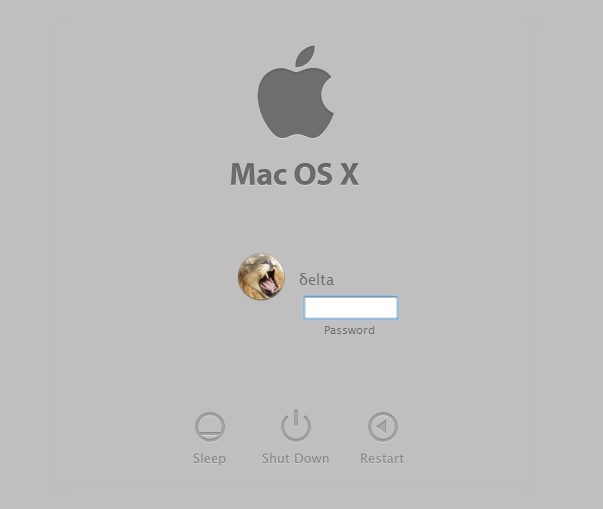
[Windows XP]Download Mac OS X Lion Login Screen for Windows XP


If you love Mac and want to get Mac OS X Lion look-like login screen in Windows XP, here is an interesting news for you.

"df006" @ DA has created Mac OS X Lion login screen for Windows XP users.


It looks very close to Mac OS X Lion's default login screen.

You can download it using following link:

Download Link

After downloading, extract the RAR file using WinRAR or 7-zip and you'll get "LogonUI.exe" file. That's the file which contains the login screen. You'll need to replace existing "logonui.exe" file present in "%windir%\System32" folder with this downloaded one. Use "Replacer" to replace the file which you can find in our "Downloads" section.

Or you can use Tuneup Utilities to easily apply the login screen which is very safe.

For better look, also install the included font file and apply the included image as your user picture.

[Windows XP]Transform Windows XP into Mac OS X Lion Using “Lion Skin Pack”

If you are a Windows XP user, you can also enjoy Mac OS X Lion interface using the transformation pack which we are going to share in this topic.

"Lion Skin Pack for XP" is an excellent customization pack for Windows XP created by our friend "hameddanger"@ DA which transforms XP into Mac OS X Lion.

This pack changes almost everything in Windows XP to transform it into Mac OS X Lion. It changes login screen, boot screen, wallpaper, theme, start button, icons, etc. It also installs a few utilities to provide Mac functionality.


It can be installed in all Windows XP, Media Center Edition and Server 2003 editions. It supports SP1, SP2 and SP3. It supports both 32-bit and 64-bit versions.

You can download it using following link:
Download Link